 PromptShot
Your markup becomes the instruction
The numbered pins and notes you draw are appended to the prompt as 'Marked areas: 1. …'. Annotation is not decoration — it overrides scope, focus, and fix target.
Drag a region → Ctrl+V → Alt+2. Nine presets ready for Cursor and Claude.
Works immediately · No account · Captures and recordings stay local
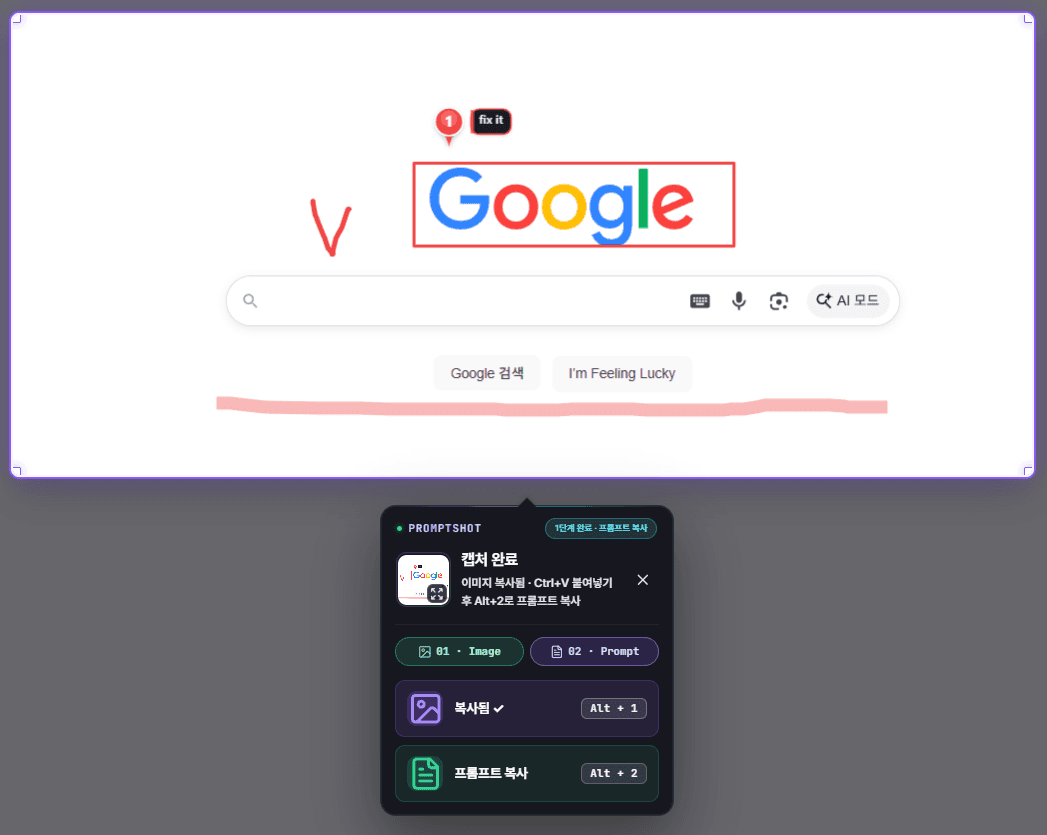
How it works
The image and the prompt are copied in two stages: paste once, then paste again.
Drag to select the UI you want to change. Free starts from the popup's Start region capture; Pro can launch with a shortcut. On Pro you can mark it up with pen, pins, and shapes.
Popup · Pro: Alt+Shift+SAs soon as the capture ends, the image is on your clipboard. Paste it into Cursor or Claude with Ctrl+V.
Ctrl+V (re-copy: Alt+1)Press Alt+2 to copy the prompt for your chosen preset, then Ctrl+V once more in the same place. The model now has both the picture and the instruction.
Alt+2 → Ctrl+VSee it
Pick a preset in the popup, mark it up if you need to, then paste twice.
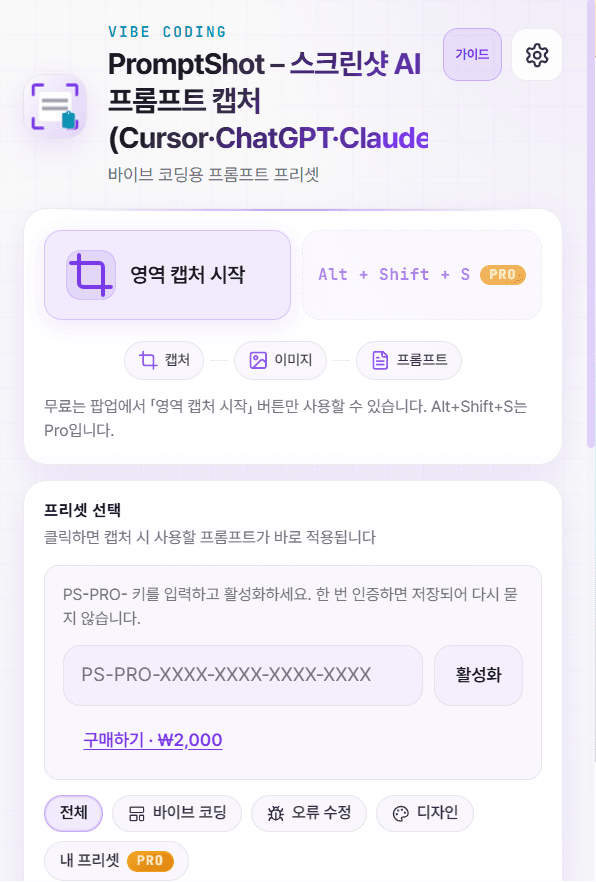
1Start from the popup
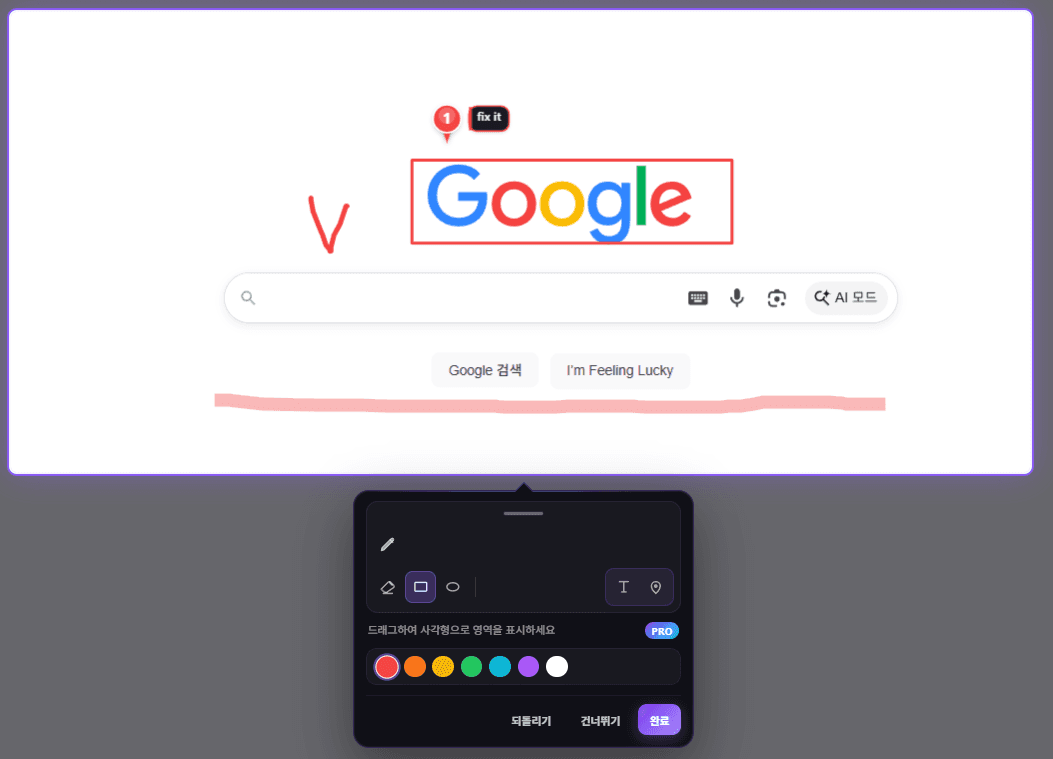
2Mark it up (Pro)
Compatibility
PromptShot writes to your clipboard, so it works anywhere you can paste.
Prompt design
Not 'build this'. Every line closes a hole the model actually falls into — and it ships alongside the image.
# Web UI implement
Implement visible UI as **React + TypeScript + Tailwind CSS** code.

Read the attached screenshot. User markup (pen, arrows, highlights)
overrides scope, focus, and fix targets.

# Read
- Parse layout, typography, color, spacing, radius, shadow, hierarchy.
- States only when visible or strongly implied (hover/focus/disabled/error/empty).

# Task
- Visible scope only (section, modal, form, widget). Semantic HTML, small components, one primary default export.
- Match layout, typography, color, spacing, radius. Accessibility (labels, focus, aria when needed).
- No redesign or questions — use placeholders for missing data.

# Deliverable
- Copy-paste-ready code blocks with imports.

# Output
- **Source code only** — no images, mockups, screenshot recreations, or long write-ups.
- No preamble, summary, or analysis steps.
- The image is input to read, not something to reproduce visually.

---
Source: https://example.com/pricing
Viewport: 1440×900
Preset: Web · UI implement
Marked areas:
1. this button is misalignedThe numbered pins and notes you draw are appended to the prompt as 'Marked areas: 1. …'. Annotation is not decoration — it overrides scope, focus, and fix target.
'The image is input to read, not something to reproduce visually.' 'No preamble, summary, or analysis steps.' This shuts down the classic failure where the model re-describes or redraws your screenshot.
'States only when visible or strongly implied.' 'No redesign or questions — use placeholders for missing data.' The model answers from what it can see instead of inventing or interrogating you.
The page URL, the viewport size, and the active preset are appended to every prompt. When you record, a Media line is added so the model knows which screen it is looking at.
Vibe coding
Bug fix
Design
Features
Free covers the core loop and nine presets. Pro completes the workflow with markup, context, history, and tab recording.
Vibe coding (web, React Native, SwiftUI, Flutter), bug fix, and design (handoff, color palette, style match). Mobile UI comes back as code too, not just web.
Annotate right after capture with fine pen, pen, highlighter, and arrow — plus speed-based width and texture. Rectangles, ellipses, text, and numbered pins say “here” without typing.
Save and edit your own prompts, and prepend or append team conventions to every built-in preset automatically.
Page URL, viewport size, and the active preset are appended to the prompt. When you record, a Media line is added so the model knows the screen context.
Keep the last 3 captures (image + prompt) locally. Re-copy or compare what you just sent without recapturing.
From the markup palette, record the full tab viewport for up to 3 minutes as WebM and download it locally. Start capture with Alt+Shift+S, then follow with Alt+1 and Alt+2.
Privacy
PromptShot does capture and prompt generation entirely inside your browser. We do not upload page content to our servers.
Compare plans
| Feature | Free | Pro $1 |
|---|---|---|
| Region capture | Included | Included |
| Two-step image and prompt clipboard copy | Included | Included |
| Nine built-in presets (web, mobile, design) | Included | Included |
| Save and edit custom presets | — | Unlimited |
| Capture markup pen (fine, pen, highlighter, arrow + shapes, pins, text) | — | Included |
| Capture keyboard shortcut · remapping | — | Included |
| URL · viewport · preset context auto-append | — | Included |
| Built-in preset prefix · suffix | — | Included |
| Capture history (last 3) | — | Included |
| Tab screen recording (up to 3 min · WebM) | — | Included |
| Billing | Free | One-time · Lifetime · No subscription |
Pricing
Start free. Move to Pro when you need it.
$0
$2$1-50%One-time · Lifetime · No subscription
FAQ
PromptShot is a Chrome extension that lets you drag to capture any region of a web page and copies the image and an LLM-ready prompt to your clipboard. It is built for pasting straight into Cursor, Claude, ChatGPT, and similar AI coding tools.
No — it is a two-step paste. When the capture ends the image is already on your clipboard, so you paste it with Ctrl+V. Then press Alt+2 to copy the prompt and paste once more in the same place. Alt+1 re-copies the image if you need it again.
Yes. Region capture, two-step image and prompt clipboard copy, and the nine built-in presets (web, mobile, design) are free. Custom presets, the markup pen, capture shortcut, URL/viewport context, prefix/suffix, capture history, and tab screen recording (up to 3 min) are Pro features, unlocked with a one-time $1 payment.
On Pro, use the Record button in the markup palette after a capture. It records the full tab viewport for up to 3 minutes as WebM, stored and downloaded locally. There is no background or continuous recording.
No. Pro is a one-time $1 payment for a lifetime license — there is no monthly fee and no renewal. Payments are processed by Paddle.
No. Capture and prompt generation run entirely in your browser, and page content is never uploaded to our servers. The only network request happens when you activate a license key yourself.
PromptShot writes to your clipboard, so it works anywhere you can paste. The prompts are shaped for Cursor, Claude, ChatGPT, GitHub Copilot, and Gemini.
After checkout you receive a license key in the PS-PRO-XXXX-XXXX-XXXX-XXXX format on the success page. Paste it into the extension popup or the options page and activate — Pro features unlock immediately.
PromptShot is a Manifest V3 extension installed from the Chrome Web Store, so it runs on Chrome and Chromium-based browsers. Capture is not available on internal browser pages such as chrome:// URLs.
Install and take your first capture right now. No account required.
Payments are processed by Paddle (https://paddle.com). Final amount may vary with exchange rates and taxes for international checkout.
OFFICE SHEET (Individual sole proprietor) sells and operates PromptShot. Checkout is processed by Paddle, which may act as Merchant of Record for tax and billing.
By purchasing, you agree to our Terms of Service, Privacy Policy, and Refund Policy.